
Registration Your Account On Pak67
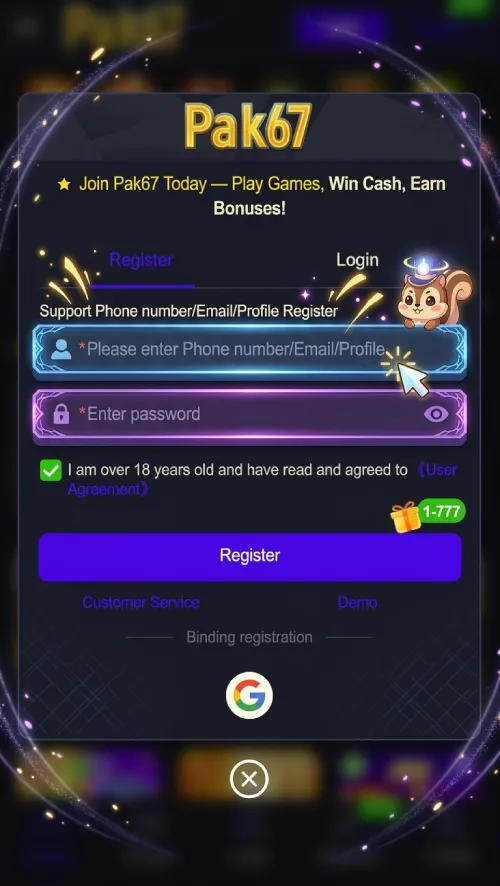
After Download Pak67 game Creating an account is the first major step for users who want to access account based features on PAK67 Game. The registration process is mainly designed around a mobile number and password, while verification can be required before the account becomes fully active. Some versions or access pages may also show additional profile or referral fields. A properly created account gives users access to areas such as the game lobby, wallet, promotions, transaction records, and other available account functions. This guide explains the registration flow in simple steps and covers the information users should check before submitting their details.
What Do You Need for Registration?
Before starting, keep an active mobile number available. The registration information reported across PAK67 pages commonly includes:
- Mobile phone number
- Password
- Verification code
- Optional referral information
- Basic profile information where requested
Use information that belongs to you and avoid creating an account with someone else’s phone number.
How to Register on PAK67
Follow these basic steps:
- Open the PAK67 application or current registration page.
- Tap the Register button.
- Enter your active mobile number.
- Create a strong password.
- Enter a referral code if the registration form provides an optional field.
- Complete the requested verification.
- Submit the registration form.
- Log in using your newly created account.
The exact fields can change when the registration interface is updated.
Mobile Number Verification
Some PAK67 registration information describes a verification code being sent to the user’s phone. This step helps confirm that the number entered during registration belongs to the person creating the account. Never give an OTP or verification code to another person. If someone contacts you and asks for your registration code, password, or wallet information, do not share it.
Creating a Strong Password
A strong password makes account protection easier. Avoid using simple combinations such as your name, phone number, or birthday.
A better password should contain a combination of:
- Uppercase letters
- Lowercase letters
- Numbers
- Special characters
Do not reuse the same password that you use for banking, email, or other important accounts.
What Happens After Registration?
After successful registration, users can normally log in and access the available account dashboard. Depending on the current version, the dashboard may include:
- Game lobby
- Wallet
- Promotions
- Referral section
- Transaction records
- Profile settings
- Support options
The exact dashboard layout can change with updates.
Is Referral Information Required?
Some PAK67 guides mention a referral code as an optional registration field. If the form shows a referral box, users can decide whether to enter an eligible code. Before accepting any referral reward, read the conditions carefully. A promotional amount does not automatically mean that the balance can be withdrawn without meeting specific requirements.
Account Verification and Financial Features
Additional verification may become relevant when users access payment or withdrawal functions. The exact requirements depend on the current service rules. Always enter accurate information when a service asks you to confirm account ownership. Incorrect details can create problems when accessing financial functions later.
Common Registration Problems
A registration attempt can fail for several reasons. The phone number may already be linked to another account, the verification code may expire, or the password may not meet the required format.
If this happens:
- Check the mobile number.
- Request a new verification code if available.
- Review the password requirements.
- Check your internet connection.
- Contact the available support channel if the problem continues.
Account Security After Registration
Once the account becomes active, keep your login details private. Do not send screenshots containing passwords, OTP codes, or wallet information to strangers. If you notice unusual account activity, change your password and contact the available support team.
Final Thoughts
PAK67 registration follows a relatively simple account creation flow based around a mobile number, password, and verification. Users should take their time when entering personal details and should protect their verification codes. Completing registration is only the beginning. Before using wallet or money based features, users should understand the applicable terms, payment rules, promotional conditions, and withdrawal requirements.